Zynga Poker Facebook From Handphone

Posted by Heru Ronaldo on Saturday, March 27, 2010 in
Yang ga punya BB ga usah nangis...apa lagi yang maniac Zynga Poker Facebook...neeh aku kasih tau caranya maen poker dari handphone...semoga handphone kalian support sama aplikasinya kayak di bawah ini neh.....


|

Google Sync vs Blackberry Mail

Posted by Heru Ronaldo on Saturday, March 27, 2010 in
Kalo dibanding secara head to head seh kayaknya memang menang BB...menang di ongkosnya...xixixiixixi....mahaaall.....!!

Sejauh ini seh ga ada masalah make Google Sync..kebetulan email kantor masuk ke dalam domail Gmail dengan custom domain..jadi ga ada beda sama Gmail umumnya...so ngapain seh mesti bayar segala...??

Emang seh cuman bisa 1 email 1 sync...tapi emang 3 email itu mesti Realtime semua...??? beuuuh...mending kalo semuanya penting.....

Lagian Phonebook dan Schedule bisa di simpen di servernya Gmail semua...so kalo memang apes-apesnya itu hape ilang...Phonebook selamat...


Google Sync: Setting Up Your Windows Mobile Phone for Google Sync


To set up Google Sync on your Windows Mobile device, please follow the steps below.

Important Note: Make sure that you have backed up any Contacts and Calendars from your phone to your computer before proceeding.

Getting Started

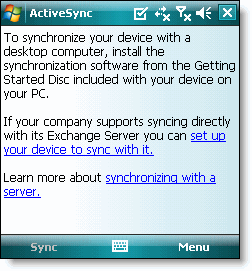
1. Open the Active Sync application on your device's home screen.
2. Click Set up your device to sync with it.
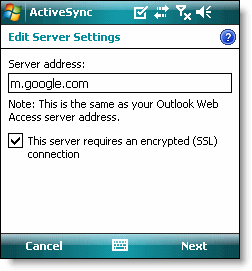
3. Enter m.google.com as the server address.
4. Ensure that the SSL option is selected.

Google sync windows mobile Google sync windows mobile server settings


5. Click Next.
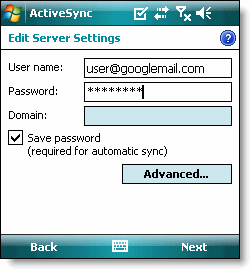
6. Enter your full Google Account email address as the User name.
7. Enter your Google Account password as the Password.
8. Leave the Domain field empty. If your device requires you to enter a domain name, enter google.
9. Click Next.
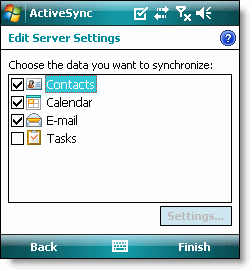
10. Check Contacts, Calendar, or Email, depending on which you'd like to sync. (Tasks is not supported and will lead to an error if checked.)
11. Click Finish.

Google sync windows mobile mail Google sync windows mobile data to sync

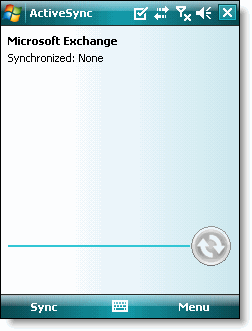
12. Press the Sync softkey on the left to synchronize.
Google sync windows mobile

You've now set up Google Sync for your Windows Mobile device.


|

Instant Messenger for WM 6.5 Smartphones

Posted by Heru Ronaldo on Saturday, March 27, 2010 in
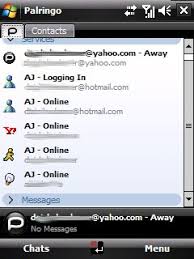
Beberapa aplikasi instant messenger buat Wm 6.5 Smartphones...pilihan seh jatuh ke BeeJive sama Palringo..so fa seh ga ada masalah berarti..masih fine-fine aja koq...


|

Facebook Mobile for WM 6.5 Smartphones

Posted by Heru Ronaldo on Saturday, March 27, 2010 in
Emang BB doank yang punya Facebook Mobile....??? neh ada buat Windows Mobile....^_^


|

Mengatasi Masalah Disconect GPRS di WinMo 6.5

Posted by Heru Ronaldo on Saturday, March 27, 2010 in
Sedikit penasaran memang awalnya...koq neh hape (HTC Snap) suka disconect terus...ternyata ada konfigurasi yang mesti diatur lagi...dasar gaptek...xixixixixi...

Coba share di sini degh...

Buka Start>Setting>Connection>Pilih Menu (Right Softkey)>Advance>Pilih Menu Lagi (Right Softkey)>Option>

- Redial Attempts ubah jadi 5
- Idle Disconect after jadi None

Done.....Restart tuh hape.....


|

Copyright © 2009 Aleka World All rights reserved. Theme by Laptop Geek. | Bloggerized by FalconHive.